Play Animation
TIP
Use this node inside your static mesh material to play vertex animation.
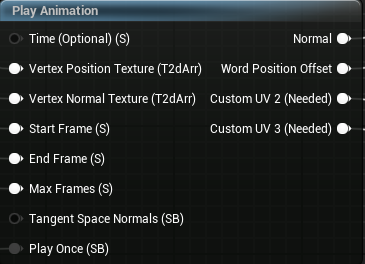
Inputs
Connect this if you want to control the animation time yourself.
By default, it is set to Time node multiplied by 30.
You should use this pin if you want to control the speed of your animation.
This is the pin to which you should connect your generated position texture array.
This is the pin to which you should connect your generated normal texture array.
Frame index from which your animation will start.
Frame index where your animation stops or loops.
You need to set this to total frames of your animation.
If disabled, make sure to disable them inside material properties.
By default this is True because it allows blending normals. But tangent space normals can sometimes produce artifacts, so you can turn it off.
Set this to True if you want your animation to stop at the last frame (End Frame).
Outputs
Returns calculated normals from your textures, connect this to your material normal pin.
TIP
If your model already uses a normal map, you can use BlendAngleCorrectedNormals node.
Returns calculated position offsets from your texture, connect this to your material World Position Offset pin.
Make sure Num Customized UVs is set to 4
Connect this to Customized UV2 pin.
Make sure Num Customized UVs is set to 4
Connect this to Customized UV3 pin.