Subsystem
UCrowdToolkitSubsystem is a World Subsystem that owns the world's one crowd actor. You
rarely use it directly - its job is to make sure a crowd actor exists
and to hand it to you.
Resolution rules
On world begin play (before any actor's BeginPlay), the subsystem resolves the crowd:
-
Adopt an
ACrowdToolkitActoralready placed in the level - typically a configuredBP_Crowdinstance. This is the recommended setup: place one, tune it in the details panel, and the subsystem uses it. -
If none is placed, spawn a plain
ACrowdToolkitActorwith default configuration.
So the crowd is guaranteed to exist by the time any gameplay code asks for it.
Keep one crowd actor per world. If several are present, the first one found wins
(arbitrary which), and a warning is logged naming the adopted and ignored actors. For
multiple independent simulations, hold direct references to each actor instead of going
through GetCrowd.
Functions
Get Crowd
Reach the crowd actor through the subsystem.
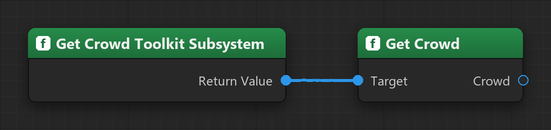
ACrowdToolkitActor* Crowd = GetWorld()->GetSubsystem<UCrowdToolkitSubsystem>()->GetCrowd();The world's crowd actor (resolving it if needed). If the actor was destroyed, it is
re-resolved on demand. BlueprintPure.
Most code reaches the crowd through the function library's GetCrowd
instead, which finds the world for you and skips fetching the subsystem first.
Lifetime notes
- Runs in game and PIE worlds only (not the editor/preview world).
- The reference is re-resolved if the crowd actor is destroyed, so a fresh actor (e.g. after a level transition) is picked up automatically.