Crowd Actor
ACrowdToolkitActor (display name Crowd Toolkit Actor) is the one object you interact with.
It wraps the simulation library as an Actor: every tunable lives as a property in its details
panel, and every operation - spawn, order, query, walls - is a Blueprint-callable function.
Each actor owns its own independent simulation (created when the actor initializes, in
PostInitializeComponents, and destroyed on EndPlay), so any number of crowd actors can run
side by side. All positions are in world
space; the simulation's X/Y maps directly to world X/Y, and Z is
tracked per agent.
Configuration properties
All config properties are EditAnywhere + BlueprintReadWrite. They are copied into the
simulation every tick (via ApplyConfig), so changing one at runtime takes effect
immediately. Clamp ranges below are the valid limits; the simulation re-clamps on apply.
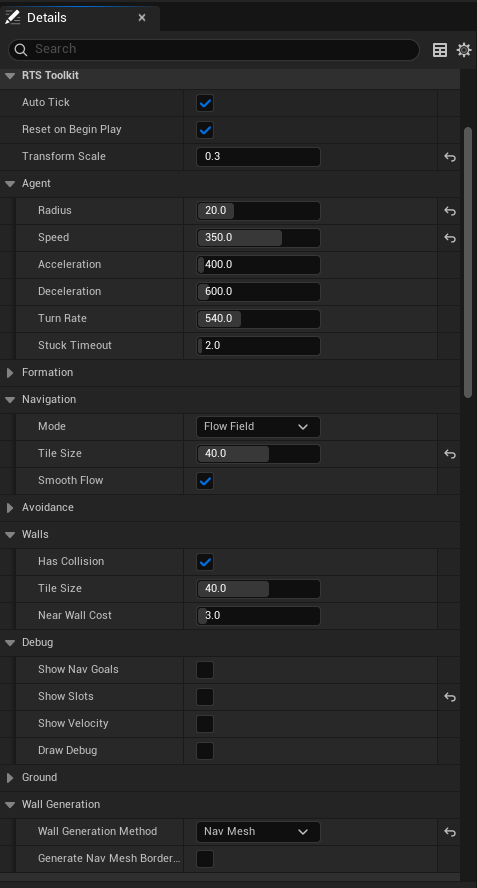
Agent
Formation
See Formations.
Navigation
See Navigation.
Avoidance
See Avoidance. Always on - these only tune it.
Both are global defaults; SetTeamAvoidance
Walls
See Wall Generation.
Ground
See Ground Snapping.
Transforms
Shape the transforms returned by GetAgentTransforms
General
Debug
There is no master switch: each overlay is drawn every tick when its own flag is on, so
untick them all to draw nothing. All default to off and are compiled out of Shipping builds.
See
Functions
Simulation control
void SimTick(float DeltaSeconds);Advance the simulation by DeltaSeconds (pushes the current config first). Called
automatically each frame when Auto Tick is on; call it yourself when you've turned Auto
Tick off and want to drive the step manually. DeltaSeconds is clamped and substepped
internally, so a frame hitch slows simulated time briefly instead of letting agents tunnel
through walls.
void ResetSimulation();Clear all agents, walls and pathfinding/avoidance caches (config is kept). Pending spawned/removed event batches are discarded - the indices they named no longer exist.
void ApplyConfig() const;Copy the actor's config properties into the simulation. Done automatically each tick; rarely called directly.
Spawning & removing
int32 SpawnAgent(const FVector& Position);Spawn one agent at Position and return its stable id
(-1 if the spawn failed). Position.Z becomes its initial
tracked Z; the simulation itself takes only X/Y.
Reported via OnAgentsSpawned.
TArray<int32> SpawnAgentGrid(const FVector& Origin, int32 Cols, int32 Rows, float Spacing);Spawn a Cols × Rows grid of agents starting at Origin, Spacing apart. Returns the
spawned agents' stable ids, one per agent.
void RemoveAgent(int32 Index);Queue the agent at Index for removal. Removals are deferred: the simulation applies the
queued batch (sorted, swap-and-pop) at the start of the next tick, so indices stay stable
between ticks and any set of agents can be removed in any order. Until that tick the agent is
still present (count and getters include it). Out-of-range indices and re-queues of an
already-queued index are ignored. Reported via OnAgentsRemoved
before the removing tick, while the index is still valid.
int32 GetAgentCount() const;Number of agents currently in the simulation (includes agents queued for removal until the next tick applies the removal).
Identity - indices & ids
See Indices & Stable IDs. Lookups that miss return -1.
TArray<int32> GetAgents() const;Every agent's index (0 … GetAgentCount()-1, in storage order) - a ready-made "all agents"
list to feed the batch getters and order functions.
int32 GetAgentId(int32 Index) const;   // stable id at Index, -1 if out of range
int32 GetAgentIndex(int32 Id) const;   // current index of Id, -1 if no such agent
TArray<int32> GetAgentsIds(const TArray<int32>& Indices) const; // id per index, -1 per out-of-range
TArray<int32> GetAgentsFromIds(const TArray<int32>& Ids) const; // index per id, -1 per unknownBatch forms - translate a whole selection in one call. Output is parallel to the input.
Per-agent getters
Each getter takes an optional index mask: pass an empty array to get every agent in storage order; pass a list of indices to get exactly those, in mask order (an out-of-range index yields a zeroed entry, so the output always lines up 1:1 with the mask). All the getters below are parallel - element i of each refers to the same agent.
TArray<FVector> GetAgentPositions(const TArray<int32>& Indices) const;World positions, including each agent's tracked Z.
TArray<FTransform> GetAgentTransforms(const TArray<int32>& FilterIndices) const;Render-ready transforms: location = agent position plus Transform Position Offset in
the agent's local space; rotation faces the travel direction
(holding the last facing while standing still) unless a
TArray<FVector> GetAgentGroundNormals(const TArray<int32>& Indices) const;Last traced ground normal per agent (world up until a trace has hit). See Ground Snapping.
TArray<FVector> GetAgentTargets(const TArray<int32>& Indices) const;Each agent's individual formation slot position.
TArray<FVector> GetAgentNavGoals(const TArray<int32>& Indices) const;The shared formation anchor the group is routing toward.
TArray<FVector> GetAgentVelocities(const TArray<int32>& Indices) const;Current velocities - use the magnitude to drive idle/walk/run animation.
TArray<bool> GetAgentSettled(const TArray<int32>& Indices) const;Latched settle (arrived) state per agent.
TArray<float> GetAgentSpeeds(const TArray<int32>& Indices) const;Effective max speed per agent - the per-agent override where set, otherwise the Speed config value.
TArray<float> GetAgentRadius(const TArray<int32>& Indices) const;Effective radius per agent - the per-agent override where set, otherwise the Radius config value.
TArray<int32> GetAgentTeams(const TArray<int32>& Indices) const;Each agent's team id. Agents spawn on team 0.
Selection queries
Return indices into the position array. The screen-rect query is the marquee-select replacement; doing it per agent in a Blueprint loop costs a visible hitch at high counts.
Every query below takes a Teams array: pass an empty array for every agent, or a
list of team ids to keep only agents on those teams.
TArray<int32> GetAgents(const TArray<int32>& Teams) const;Every agent, or every agent on one of Teams.
TArray<int32> GetAgentsInRect(const FBox2D& Rect, const TArray<int32>& Teams) const;Every agent inside the world-space XY rectangle.
TArray<int32> GetAgentsInRadius(const FVector& Center, float Radius,
                                const TArray<int32>& Teams) const;
Every agent within Radius of Center on the XY plane (Center.Z ignored).
TArray<int32> GetAgentsInScreenRect(APlayerController* PlayerController,
                                    const FVector2D& ScreenMin,
                                    const FVector2D& ScreenMax,
                                    const TArray<int32>& Teams) const;
Every agent whose position projects inside the screen-space rect [ScreenMin, ScreenMax]
(inclusive) for the given player - marquee selection in one call. Projection uses each
agent's tracked Z, so it matches what the player sees.
TArray<int32> FilterAgents(const TArray<int32>& Indices,
                           const TArray<int32>& Teams) const;
Keep only the agents in Indices that are on one of Teams, preserving order and dropping
out-of-range entries. For narrowing a selection you already have rather than running a fresh
spatial query.
int32 GetNearestAgent(const FVector& Center, float Radius,
                      const TArray<int32>& Teams, float& OutDistance) const;
Closest agent to Center on the XY plane, or -1 if none qualifies. Radius <= 0 searches
everywhere. The "find me a target" call - closest enemy to this unit, closest friendly to
this healer.
Orders
void SetAgentsTarget(const TArray<int32>& Indices, const FVector& Position,
                     ECrowdToolkitFormationAnchor Anchor = ECrowdToolkitFormationAnchor::NearEdge);
Order Indices into a formation at Position. The core
movement call. Replacing an unfinished order fires
OnAgentsOrdersCanceled for the affected agents.
Anchor decides where the group sits relative to Position:
See Anchor.
void SetAgentTarget(int32 Index, const FVector& Position,
                    ECrowdToolkitFormationAnchor Anchor = ECrowdToolkitFormationAnchor::NearEdge);
Single-agent convenience - a formation of one, so the agent simply walks to the point.
Teleport
void SetAgentsPositions(const TArray<int32>& Indices, const TArray<FVector>& Positions);
void SetAgentPosition(int32 Index, const FVector& Position);
Move agents instantly to the given positions (Indices[i] goes to Positions[i]). They stand
there settled. Any order they had is dropped (OnAgentsOrdersCanceled fires), and any follow
ends. A position inside a wall is pushed out on the next tick.
Per-agent speed
On top of the global Speed default, you can cap individual agents.
void SetAgentsSpeed(const TArray<int32>& Indices, float Speed);
void SetAgentSpeed(int32 Index, float Speed);
Set the max-speed override. Speed < 0 resets the agents to the global Speed config
value; Speed >= 0 is an absolute per-agent cap (0 freezes them in place). Read the
effective values back with GetAgentSpeeds
Per-agent radius
On top of the global Radius default, individual agents can be resized. The per-agent radius drives avoidance, wall collision, and formation slots - each slot is sized to its agent, with big agents forming up front and centre. Pathfinding always uses the global Radius, so an agent set larger than it can be routed through gaps too narrow for its body - keep Radius close to your largest agent when the map has tight passages.
void SetAgentsRadius(const TArray<int32>& Indices, float Radius);
void SetAgentRadius(int32 Index, float Radius);
Set the radius override. Radius < 0 resets the agents to the global Radius config
value. Read the effective values back with GetAgentRadius
Teams
Each agent carries one team id, used to filter
void SetAgentsTeam(const TArray<int32>& Indices, int32 Team);
void SetAgentTeam(int32 Index, int32 Team);
Assign the team. Any integer works, including negatives - the numbers are yours to define.
Agents spawn on team 0. Read them back with GetAgentTeams
Team avoidance
Override the global Strength and Settle Push for one pair of teams. Rules are
symmetric - (1, 2) and (2, 1) are the same rule - and passing the same team twice
sets the rule within that team.
void SetTeamAvoidance(int32 TeamA, int32 TeamB, float Strength, float SettlePushStrength);Each value is read independently:
Both 0 makes the two teams ignore each other and walk straight through one another.
Crowd->SetTeamAvoidance(1, 2, 0.0f, -1.0f);  // no jostling in transit, still steps aside when idle
Crowd->SetTeamAvoidance(1, 1, 60.0f, -1.0f); // team 1 packs tightly among itself
TIP
SettlePushStrength maps to the Settle Push config property. The pin is named
differently because Unreal doesn't allow a function parameter to shadow a property name.
void ClearTeamAvoidance(int32 TeamA, int32 TeamB);
void ClearAllTeamAvoidance();
Drop one pair's rule, or every rule. Cleared pairs fall back to the global values.
bool GetTeamAvoidance(int32 TeamA, int32 TeamB,
                      float& OutStrength, float& OutSettlePushStrength) const;
Returns false when no rule is set for the pair, in which case both outputs read -1.
TIP
Use this for mixed-speed groups (cavalry vs infantry), slows/buffs, or freezing units in place without removing them.
Facing targets
By default an agent's rendered facing follows its travel direction. A facing target
overrides that: the agent's facing steers toward a world position - at Turn Rate, so it
swings around instead of snapping - whether the agent is moving, settled or idle. It affects
rendering only: the rotation from GetAgentTransforms
void SetAgentsFacingTarget(const TArray<int32>& Indices, const FVector& Target);
void SetAgentFacingTarget(int32 Index, const FVector& Target);
Steer the agents' facing toward Target (on the XY plane - Target.Z is ignored). The
target is stored against each agent's stable id, so it
survives index reshuffles and persists until cleared or the agent is removed. An agent
standing (nearly) on its facing target holds its current facing instead of spinning.
Out-of-range indices are ignored.
TIP
Classic uses: units keeping their front toward the enemy while repositioning, guards watching a gate, a crowd turning toward a speaker.
void ClearAgentsFacingTarget(const TArray<int32>& Indices);
void ClearAgentFacingTarget(int32 Index);
Remove the override. Facing goes back to following the travel direction (still turn-rate limited), holding its last direction while the agent stands still.
Following
See Following.
bool SetAgentsFollowTarget(const TArray<int32>& Indices, int32 LeaderIndex, ECrowdToolkitFormationAnchor Anchor = NearEdge);
bool SetAgentFollowTarget(int32 Index, int32 LeaderIndex, ECrowdToolkitFormationAnchor Anchor = NearEdge);
Make the agents follow the agent at LeaderIndex, formed up as a SetAgentsTargetfalse if the leader doesn't exist or the order
would create a follow loop.
void ClearAgentsFollowTarget(const TArray<int32>& Indices);
void ClearAgentFollowTarget(int32 Index);
Stop following. The agents settle where they are.
TArray<int32> GetAgentFollowTargets(const TArray<int32>& Indices) const;Index of the agent each agent follows, or -1. Empty Indices = every agent.
Walls
See Wall Generation.
void AddWallTile(int32 X, int32 Y);Block the wall-grid tile at (X, Y). Idempotent - adding an existing tile is a no-op.
void RemoveWallTile(int32 X, int32 Y);Unblock the tile at (X, Y); affected routes re-plan on the next tick. A tile the nav-mesh
sync owns comes back on its next run if the nav mesh still blocks that spot.
void ClearWallTiles();Drop every wall tile, including nav-mesh-generated ones.
TArray<FIntPoint> GetWallTiles() const;Every blocked wall tile, as grid coordinates.
int32 GenerateWallTiles();Generate walls using the selected Wall Generation Method (None is a no-op). Called once
on BeginPlay; returns the number of tiles added.
int32 GenerateWallTilesFromNavMesh();Sync the wall grid to the world's built navigation mesh (see Seeding walls from the nav mesh): newly blocked cells are added, and cells the nav mesh freed since the last run are removed. Only tiles this function created are ever removed, so manually stamped walls survive. Runs automatically after runtime nav rebuilds when Sync Walls With Nav Mesh is on. Returns the number of tiles changed.
Events
Multicast delegates - bind in Blueprint or C++. Full timing and usage in Events.
Debugging & diagnostics
Tick any of the debug flags (Draw Walls, Draw Agents, Show Slots, Show Nav Goals, Show Velocity, Show Teams, Show Flow Field, Show A* Paths) to draw that overlay into the world. There is no master switch; untick them all to draw nothing.
Keep the overlays off when measuring performance - the agent overlays fetch every agent array and issue per-agent debug primitives, which dominates the frame at high agent counts. They are compiled out entirely in Shipping builds.
int32 GetFlowFieldCount() const;   // number of cached flow fields
int64 GetFlowFieldBytes() const;   // their total memory
The cache grows with the world region the agents span - handy for understanding memory under Flow Field navigation.
TArray<ECrowdToolkitPathfindingMode> GetAgentPathfindingModes(const TArray<int32>& Indices) const;Which backend moved each agent last tick: Flow Field, Spatial A*, or None (standing
still). Useful to see what Auto mode picked. Empty Indices = every agent.