Rendering Agents
The crowd actor is simulation only: it tracks each agent's position, velocity, facing and ground height, but it draws nothing. You decide how agents look by reading their transforms each frame and feeding them to a renderer - typically an Instanced Static Mesh (ISM) so thousands of agents cost a handful of draw calls.
Set up the renderer
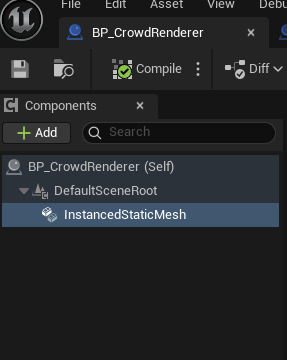
Make an Actor with an Instanced Static Mesh component and assign the mesh your agents should use.
What GetAgentTransforms gives you
Each transform is ready to render - no extra math needed:
- Location - the agent's world position, including its tracked Z (see Ground Snapping).
- Rotation - faces the agent's travel direction, holding the last facing while idle (so meshes don't snap back to identity), always turning at the crowd's Turn Rate so heading changes swing smoothly. A facing target, when set, overrides the travel direction (face the enemy while repositioning). Tilted to the ground normal when Align Transforms To Ground is on. If your mesh faces the wrong way, fix it once with Transform Rotation Offset on the crowd actor.
- Scale -
TransformScale(a property on the crowd actor).
Pass an empty array for all agents, or a list of indices to get just those.
The render loop
The simplest correct version, on your renderer's Tick:
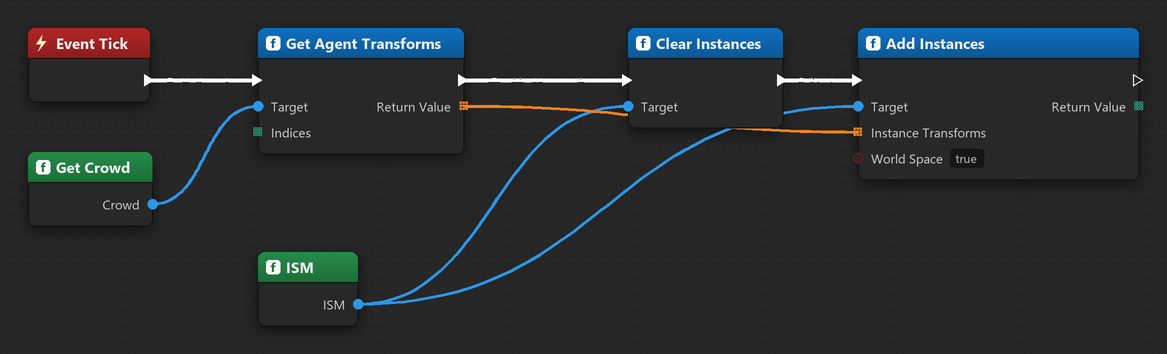
BP_CrowdRenderer in the plugin's content folder.
TArray<FTransform> Transforms = Crowd->GetAgentTransforms({});

ISM->ClearInstances();
ISM->AddInstances(Transforms, /*bReturnIndices*/ false, /*bWorldSpace*/ true);
Updating in place (recommended)
ClearInstances + AddInstances every frame works, but rebuilds the whole instance buffer.
When the agent count is stable, update transforms in place instead - add the instances once,
then batch-update each tick:
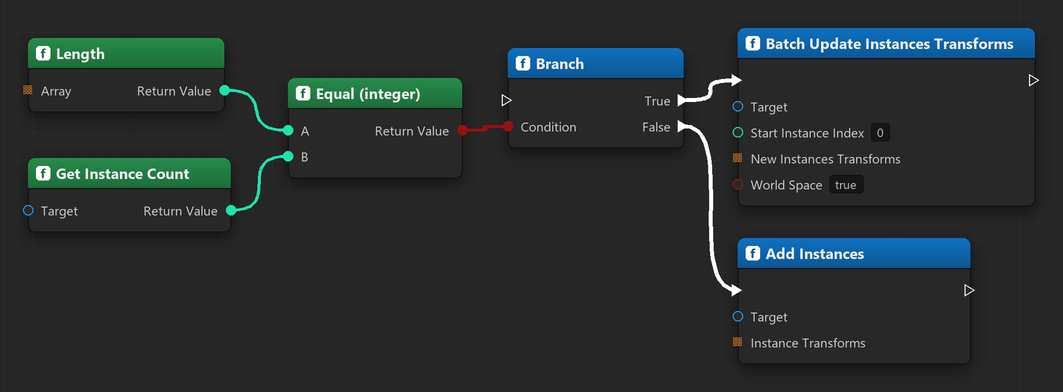
BP_CrowdRenderer in the plugin's content folder.
if (ISM->GetInstanceCount() != Transforms.Num())
{
    ISM->ClearInstances();
    ISM->AddInstances(Transforms, /*bReturnIndices*/ false, /*bWorldSpace*/ true);
}
else
{
    ISM->BatchUpdateInstancesTransforms(0, Transforms, /*world*/ true, /*markDirty*/ true, /*teleport*/ true);
}
Hook the crowd's OnAgentsSpawned / OnAgentsRemoved events to
resize only when the population actually changes.
Driving an animation
GetAgentVelocities and GetAgentSettled let you pick an animation state per agent (idle vs
walk/run) without extra bookkeeping - feed the velocity magnitude into a per-instance custom
data float and let the material/animation pick a pose from it. For a fully GPU-instanced
animated crowd, combine this with a vertex-animation-texture material.